
PART 6 — ORDERS & COMMISSIONS
Navigation: Sidebar → Orders & Commissions
URL: /orders
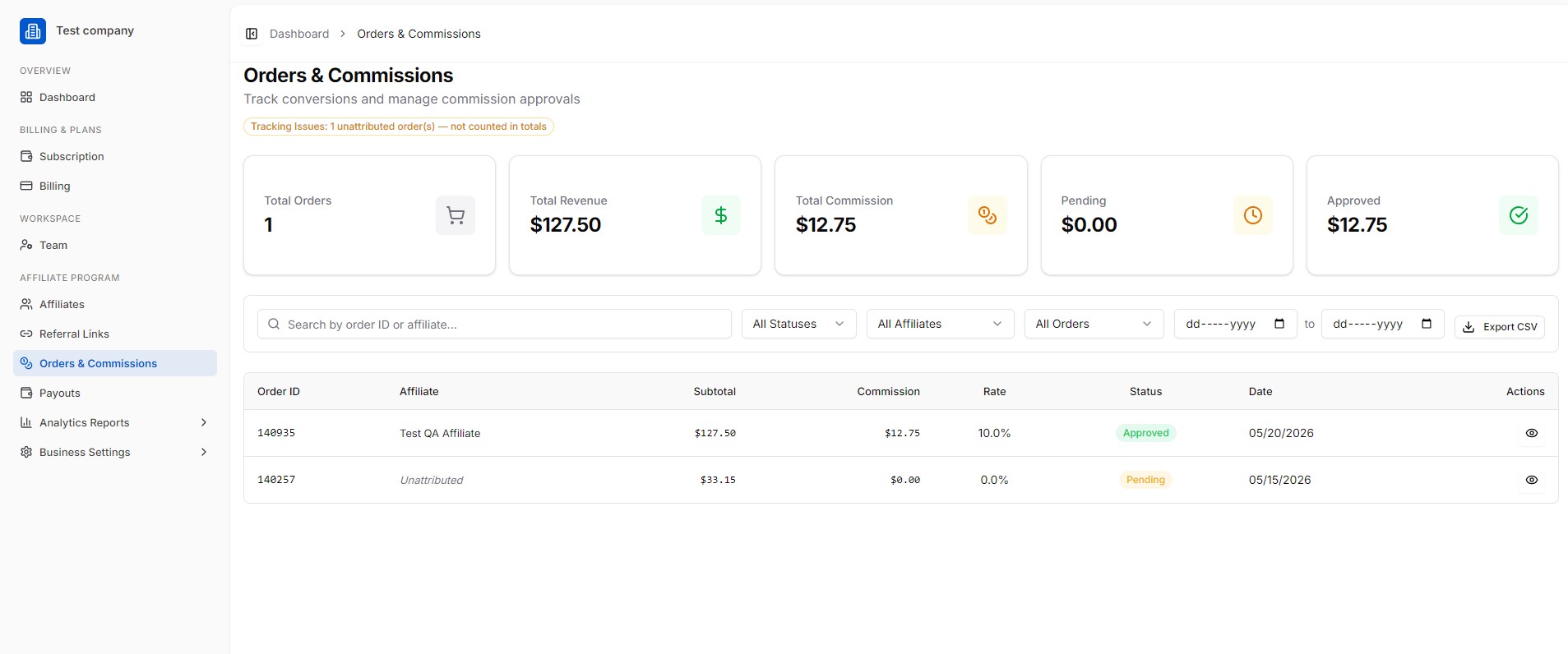
This section tracks all conversions (purchases, sign-ups, leads) driven by affiliates and lets you manage commission approvals.
6.1 Summary Cards
| Metric | Meaning |
|---|---|
| Total Orders | Number of tracked conversions |
| Total Revenue | Gross revenue attributed to affiliates |
| Total Commission | Total commissions owed |
| Pending | Commissions awaiting approval |
| Approved | Commissions approved for payout |
6.2 Filtering Orders
Use the advanced filter row to narrow down orders by:
- Status (All Statuses, Pending, Approved, Rejected)
- Affiliate (All Affiliates, or pick a specific one)
- Order Type (All Orders)
- Date Range (From / To date fields)
6.3 Order Table
Each order record shows: Order ID, Affiliate, Subtotal, Commission, Rate, Status, Date, Actions.
6.4 Exporting Data
Click “Export CSV” to download all orders as a spreadsheet for your own accounting or analysis.