
PART 3 — DASHBOARD NAVIGATION
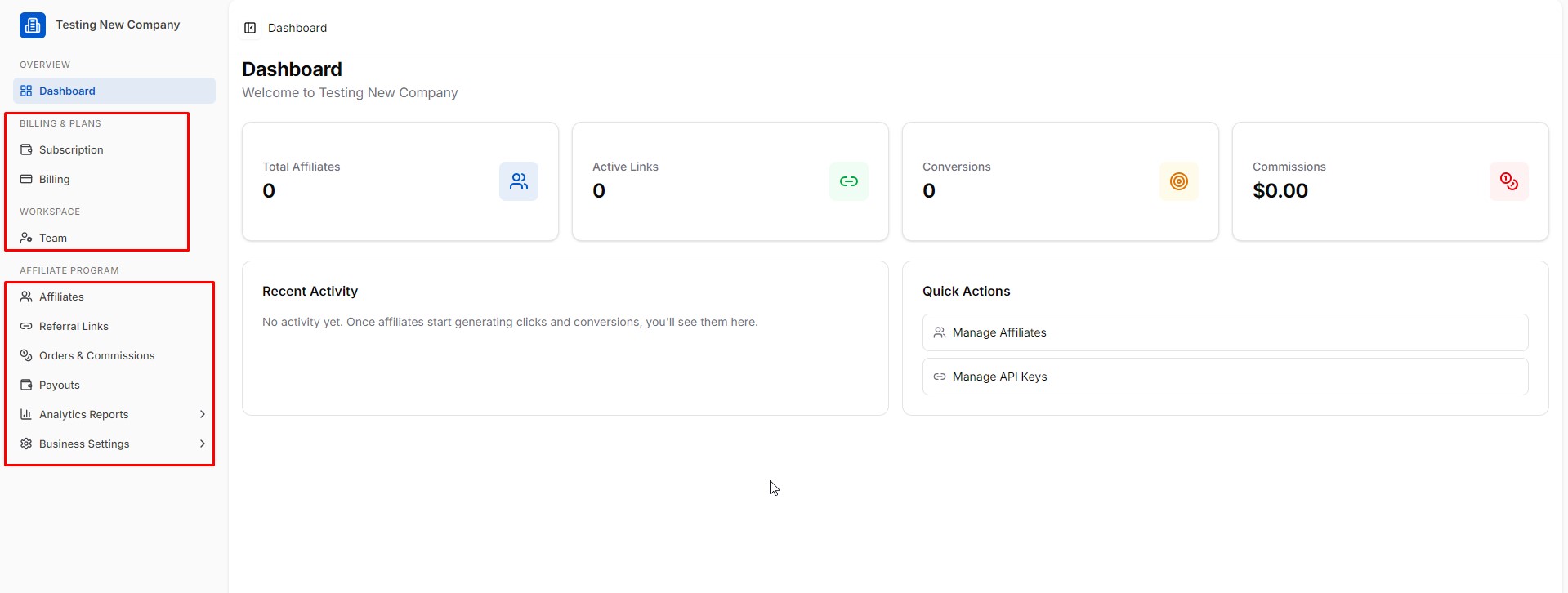
The dashboard is divided into two areas: the left sidebar navigation and the main content area.
3.1 Sidebar Structure
The sidebar is organised into four sections:
OVERVIEW
- Dashboard — Home screen with KPI summary cards
BILLING & PLANS
- Subscription — Manage your plan and upgrade
- Billing — View invoices and payment history
WORKSPACE
- Team — Add and manage team members
AFFILIATE PROGRAM
- Affiliates — Manage affiliate partners
- Referral Links — Create and manage tracking links
- Orders & Commissions — View all conversions and approve commissions
- Payouts — Process and track affiliate payments
- Analytics Reports → Overview, Conversions, E-commerce, Coupons, Affiliates, Links
- Business Settings → General, Branding, Commission Tiers, Email Templates, Join Page, Payouts, API Keys, Activity Log
3.2 Dashboard KPI Cards
The main dashboard shows four top-level metrics:
| Metric | What it Shows |
|---|---|
| Total Affiliates | Number of registered affiliate partners |
| Active Links | Number of active referral tracking links |
| Conversions | Total conversions/sales tracked |
| Commissions | Total commission owed to affiliates |
Below the metrics are two panels:
- Recent Activity — Live feed of affiliate clicks, signups, and conversions
- Quick Actions — Shortcuts to Manage Affiliates and Manage API Keys